

What if the most helpful technology at home is the device an older person actually feels comfortable using? A personal alarm, simple reminder or easier way to call family may support everyday independence, but unfamiliar screens and monitoring can feel confusing or intrusive. For families exploring companionship care services in Newbury, technology should be a choice that supports the person, not a substitute for human connection.
It’s understandable to feel unsure about what’s useful, how to set it up and where to turn for help. Start with a manageable goal, introduce any tool at the older person’s pace and with their consent, and check privacy settings and ongoing support before relying on it. This guide also explains when conversation, a reassuring presence or practical help from a companion remains important.
Bloomfield Care provides companionship and domiciliary care in Newbury. This person-centred human support may sit alongside technology chosen by the individual. The aim is to help make home feel safer and more comfortable while respecting the person’s preferences, dignity and independence.
Key Takeaways
- Identify the everyday task the older person wants help with, then consider tools that fit their preferences and abilities.
- Compare communication, reminder and home-safety options. Check setup needs, privacy settings, connectivity and limitations before choosing.
- Introduce a device gradually, with the person’s consent. Give them time to practise and decide whether it feels useful.
- Technology can support selected routines, but it can’t provide human judgement, personal care or the reassurance of companionship.
- Companionship care services in Newbury may complement suitable technology when human connection is an important part of support at home.
How technology can support seniors living at home in Newbury
Technology support at home means choosing tools that may help with communication, familiar routines or everyday safety. Rather than starting with a device catalogue, talk about what the older person wants to make easier, what they already manage confidently and how they prefer to stay in touch.
Some people enjoy trying a new tool; others prefer a familiar telephone or no new technology at all. Both choices deserve respect. The wider field of Gerontechnology explores how technology relates to ageing, but a useful choice at home is specific to the individual. A device should support autonomy, not create pressure or replace companionship and appropriate care.
What does technology support at home include?
Everyday examples include video calls to family, an accessible phone with features that suit the user, or a reminder for a routine they have chosen. These are possibilities, not prescriptions. Consider whether the controls are easy to see and use, whether the device suits the home and whether it supports the person’s preferred way of communicating.
Communication and reminder tools aren’t the same as monitored or emergency-response services. Features and limitations vary. Check the manufacturer’s or service provider’s current information, including what happens if a device is activated or loses its connection.
When might an older person in Newbury find it helpful?
A video call may make it easier to catch up with family who live elsewhere. A simple reminder could support a familiar daily routine if the person wants one. Someone who values independence and familiar habits may welcome a practical way to stay connected, while another person may prefer visits or ordinary phone calls.
Age, health conditions and confidence with technology don’t determine what someone needs. Ask what would feel useful, what they already enjoy using and whether they want to try anything at all. Start with one small goal, then let the person decide if the tool genuinely helps.
Technology can assist with selected tasks, but it can’t offer human judgement, conversation or a reassuring presence. For some households, companionship care services in Newbury may provide human connection alongside chosen tools. Bloomfield Care provides companionship and domiciliary care in Newbury. This support complements technology rather than supplying or setting up devices, and the person’s wishes should remain central as needs and preferences change.
Which home technology options may suit an older person’s needs?
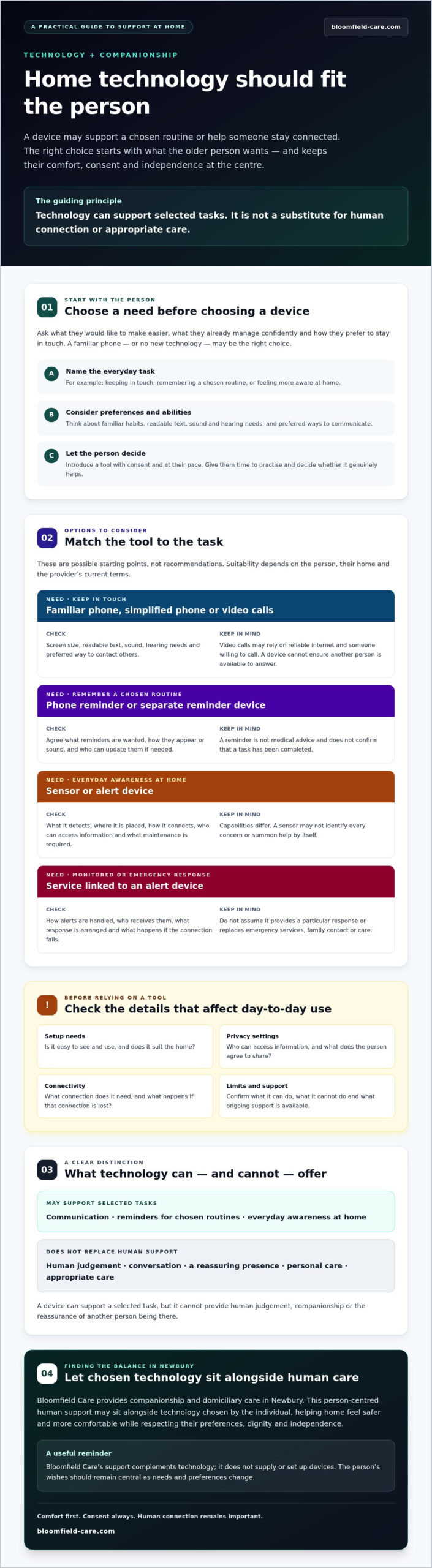
Match a tool to a specific, person-chosen need rather than choosing a device because it has the most features. The table offers starting points, not recommendations. Suitability depends on the person, their home and the provider’s current terms. Before deciding, confirm what the device can do, what it needs to work and what it cannot do.
| Need | Possible tool | Setup considerations | Limitations |
|---|---|---|---|
| Keeping in touch | A familiar phone, a phone with a simplified interface, or a video-call device | Consider screen size, readable text, sound and hearing needs, and the person’s preferred way to contact others. Video calls may depend on reliable internet and someone willing to call. | Some options take practice or rely on connectivity. A device cannot ensure that another person is available to answer. |
| Remembering a chosen routine | A basic reminder function on a phone or a separate reminder device | Agree what reminders are wanted, how they should appear or sound, and who will help update them if needed. | A reminder is not medical advice and doesn’t confirm that a task has been completed. |
| Everyday awareness at home | A sensor or alert device, depending on the person’s needs | Ask what it detects, where it is placed, how it connects, who can access information and what maintenance is required. | Capabilities differ. A sensor may not identify every concern or summon help by itself. |
| Monitored or emergency response | A service linked to an alert device | Check how alerts are handled, who receives them, what response is arranged and what happens if the connection fails. | Don’t assume it provides a particular response or replaces emergency services, family contact or care. |
Communication tools for staying connected
A familiar telephone may suit someone who prefers calls, while larger text or a simpler screen may make a device easier to use. Video calling can help when both people welcome it, but it may require a suitable connection and a family member or friend who can join. Check the sound, readability and controls together, then let the older person choose the method that feels comfortable.
Reminders and home-safety technology
Reminders can support a routine the person has chosen, but they shouldn’t be treated as clinical guidance. Sensors and alerts vary in what they detect and how they work. Before selecting one, verify privacy settings, connectivity, maintenance needs and emergency-response limits with the manufacturer or service provider. Find out who receives information and what happens if the device stops working.
If human connection is also part of the support a household is considering, companionship care services in Newbury may be worth discussing with Bloomfield Care. Companionship can sit alongside suitable technology, not replace it or provide device setup.
Will technology replace companionship or personal care?
No. Technology may help with a selected task, such as sharing a message or providing a reminder, but it can’t offer human companionship or make every judgement a person might need. A device may be convenient and consistent, yet it can require setup, a working connection and someone to check that it still suits the user. Features and limits depend on the specific device or service, so confirm them with the provider.
Using a device doesn’t necessarily mean someone needs less support, and not using one doesn’t mean they can’t manage at home. Understand care needs through conversation with the person, taking account of their wishes, daily life and changing circumstances. A technology choice is one detail, not a measure of independence or a substitute for discussing appropriate care.
What technology can and cannot do
A tool can only help in the ways its verified features allow. A reminder may prompt a chosen routine, while a communication device may make it easier to contact someone. Neither can interpret every situation, understand how a person is feeling or respond with the flexibility of human care.
Don’t treat an alert or sensor as a guarantee of safety, fall prevention or emergency assistance. Before relying on a monitored service, ask its provider who receives an alert, what response is arranged and what happens if the device or connection fails. For urgent or safeguarding concerns, speak with appropriate professionals rather than relying on a device to assess or resolve the situation.
How companionship can complement digital tools
An older person may choose to use a communication tool between family conversations, or a reminder to support a routine they want to maintain. That can sit alongside visits and personal contact, rather than take their place. Companionship brings something a device can’t: conversation, shared time and a person who can respond to the moment.
Families considering companionship care services in Newbury can discuss the person’s preferences and the kind of human support that may suit them. Its care is human support that may complement suitable technology; it does not provide technology setup or device support. Keep the older person involved in those conversations, and seek appropriate professional advice if needs or safeguarding concerns arise.
How to introduce technology support at home step by step
A new device should fit into the person’s life, not turn their home into a technical project. Move at a comfortable pace and involve the older person from the first conversation. They can decide to try a tool, wait or say no.
- Identify the need. Ask what, if anything, the person would like to make easier. Keep the goal specific, such as staying in touch or remembering a chosen routine.
- Discuss preferences. Find out what feels familiar, what they’d rather avoid and whether they want family or another trusted person involved. Don’t assume age, health or past experience tells you what they’ll find useful.
- Compare suitable options. Check whether the controls and instructions feel manageable. Before choosing, review accessibility features, connection requirements, privacy settings, ongoing costs if applicable and the support the provider offers.
- Agree on setup and help. Decide together who will arrange the device and who can help if it needs attention later. Don’t assume a care agency will install, maintain or troubleshoot technology. Confirm the provider’s guidance and support arrangements before committing.
- Practise without pressure. Introduce one change at a time. Let the person try it when they feel ready, and offer clear instructions they can revisit if they want them.
- Review together. Ask whether the tool feels helpful, comfortable and private. Adjust settings or stop using it if the person requests a change.
Keep consent and privacy central
Before activating accounts, sharing access or enabling monitoring, explain what information may be collected and who could see it. Check permissions and data-sharing settings using the device or service provider’s current guidance. The older person should understand and agree to the choice; family convenience alone isn’t a reason to switch on a feature.
For any monitored or emergency-response service, ask the provider how it works, what response is arranged and what happens if the connection or device fails. If you’re looking for Newbury-specific technology advice, verify that a local service is currently available and what help it provides before relying on it.
If you’re also considering human support at home, discuss companionship care services in Newbury with Bloomfield Care. Bloomfield provides companionship and domiciliary care, which may complement suitable technology, but does not provide device setup or technical support.
Finding the right balance of technology and care in Newbury
The right balance starts with what the older person wants their days at home to feel like. If the main priority is staying connected, a communication tool may be worth considering. A reminder could suit someone who wants help with a chosen routine. If the concern is safety, check what advice or support is appropriate rather than assuming a device can monitor every situation. If the person wants conversation or a reassuring human presence, technology alone won’t meet that need.
Needs and preferences can change, so treat any choice as something to review together, not a permanent solution. Ask whether a device still feels useful and whether the person would prefer a different approach. Keep family conversations and suitable professional advice part of the picture, especially if concerns arise that a device cannot assess or respond to.
Questions to ask before deciding on support
- What would the person like to make easier, and what do they want to keep exactly as it is?
- Would they welcome a digital tool, human support, both, or neither at this time?
- Who will handle device setup, connectivity, updates and faults? Confirm this with the provider rather than assuming a care agency will do it.
- Would regular companionship or domiciliary care address a need that a device cannot, such as conversation or human help at home?
When to talk with a home-care provider
A conversation with a home-care provider may help when the person wants regular human company or support at home. Bloomfield Care provides person-centred companionship and domiciliary care in Newbury. This is human support that may complement technology the person chooses; Bloomfield doesn’t sell or install devices. Discussing care needs can help families consider what support may fit the person’s wishes, without treating a device as a substitute for personal contact.
If you’re exploring companionship care services in Newbury, you can talk with Bloomfield Care about support at home. A calm conversation is a useful way to consider the person’s preferences and possible care needs.
Choose support that fits the life at home
The next step should be guided by the older person’s priorities. A device may help with a chosen routine or make it easier to keep in touch, but it should be introduced with consent and reviewed if preferences change. Technology can support selected tasks; it can’t replace human connection or appropriate care.
If companionship or help at home is part of the conversation, Its role is human support, not selling or setting up technology. Families exploring companionship care services in Newbury can discuss what kind of support may suit the person and their wishes.
Talk with Bloomfield Care about companionship and support at home. A thoughtful conversation can help you consider the options at your own pace, while keeping dignity and independence at the heart of the decision.
Frequently Asked Questions
Can technology help older people stay independent at home?
It can support selected routines, communication or home-safety arrangements if the person finds it useful and comfortable. What works depends on individual needs, preferences, accessibility and the device’s verified features. Someone may choose a reminder for a familiar routine or a tool to contact family. Discuss the choice together and check limitations with the provider. Technology can’t guarantee safety or replace human care.
What is the best technology for seniors living at home?
There’s no single best device for everyone. Start with one practical goal, such as making calls easier or remembering a preferred routine, then compare tools designed for that purpose. Check whether the screen and controls are easy for the person to use, whether hearing or readability needs are met, and what privacy and connectivity requirements apply. Ask who can help if it stops working. Trying a simple option may clarify whether it suits them.
Can a home-care carer help an older person use technology?
It depends on the provider, the agreed care arrangements and the carer’s role, so ask directly what help is included. Don’t assume a care worker can install, repair or troubleshoot a device; technical help may need to be arranged separately. Bloomfield Care provides companionship and domiciliary care, but its stated services don’t include technology setup. Confirm responsibilities before introducing a device so the person knows who to contact if they need assistance.
Are technology devices a replacement for companionship care?
No. Depending on their features, devices may support communication, reminders or alerts, but they can’t provide conversation, emotional connection or personal judgement. Someone might choose to use a phone to stay in touch between visits from family, friends or a care professional. Consider what matters most to the older person. If human company or help at home is wanted, companionship care services in Newbury may be one option to discuss with a local provider.
How do I introduce a new device to an older person at home?
Begin by asking what the person would like help with and whether they want to try a device. Explain its purpose and limitations, then choose an option with controls and instructions they can manage. Practise together at their pace, without pressure. Before use, review privacy settings and agree who can access information. Later, ask whether it feels helpful and comfortable. Respect their choice to adjust or stop using it.
Where can families find technology support for seniors in Newbury?
Start with the device provider’s current setup and support information. You can also check directly with relevant West Berkshire services for local technology advice or digital-inclusion help, confirming availability, eligibility, location and contact details. For human support at home, Bloomfield Care provides companionship and domiciliary care in Newbury, as well as serving Wallingford, Thatcham, Abingdon, Oxford, Dorset, Weymouth, Christchurch and Poole. Ask any provider what its care includes and whether technical support is outside its role.